

A salon price list you change without reprinting the window
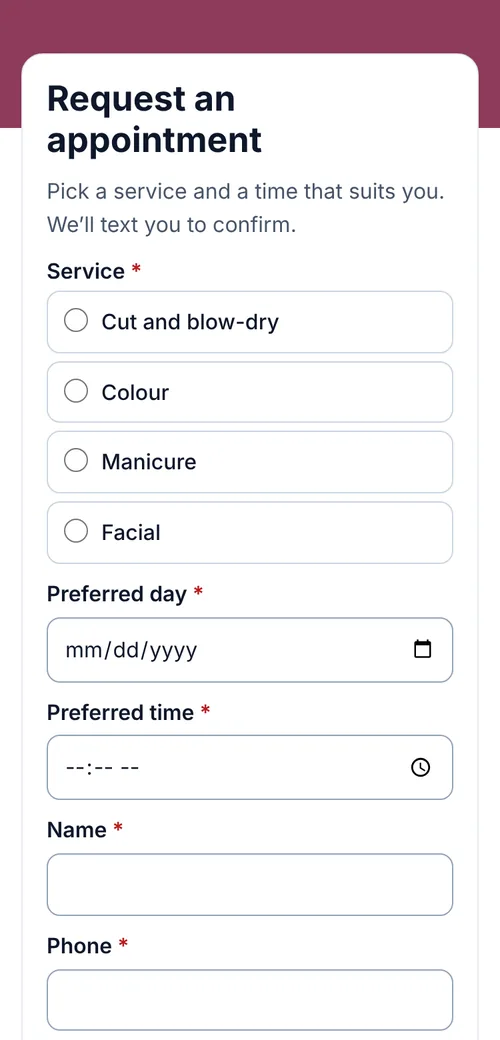
Prices go up in January, and the list in the window and the card at every mirror are wrong. A QR code opens your services and prices page instead, which you edit in a minute, and an appointment request form, so clients book without phoning while you’re mid-cut.
In short
What can a salon use QR codes for?
In shortA services and prices page on the window, an appointment request form at each mirror, a loyalty card for regulars, your Instagram and a Google review link. Change a price on the page and the window card shows it on the next scan. Requests arrive in your Leads list and by email; you reply to confirm, so it works alongside whatever diary you keep now.
If you cancel, the window and mirror cards still open your price page as you last published it, because the code points to a short link we run, not to your plan. Until you subscribe again, prices can’t be edited, the request form stops taking requests and new loyalty stamps stop. The pledge sets this out.
At a glance
- Appointment requests
- A form with service, day and time; you confirm (any paid plan)
- Services and prices
- A page from the salon, barber or spa template (any paid plan)
- Loyalty card
- Stamps on the phone, scissors icon, no app (any paid plan)
- Reviews and Instagram
- Free static codes
- Not included
- A live booking calendar or payments
The workflow
From window to booked chair
Make the request form
Service as a choice, preferred day and time, name and phone. Up to 30 questions if you need more.
Print the code
On the window for passers-by, on a card at each mirror for the next visit, and in your Instagram bio as a link.
Requests come in
An email for each one, and a list in Leads showing which code it came from.
Confirm and track
Text or call to confirm, then set the request’s status so the team sees what’s done.
The codes
What each code does
- Appointment requestsA form people finish on a phone in a minute, tagged with the code it came from. Lead forms.
- Services and pricesA page with your treatments, prices, team and hours, from the hair salon, barbershop or day spa template in the page builder. Update a price and it’s live.
- Loyalty card“Your sixth blow-dry is on us.” Clients join from your page and get a stamp at the desk. Loyalty cards.
- InstagramA free Instagram code on the mirror, so clients follow while they wait, or a social media page with all your profiles.
- Google reviewsA free review code on a card at the till, when the client is happiest.
- Already use booking software?Point a dynamic code at your booking link instead, and still count scans per window or mirror.
Compared
What a request form does, and what booking software does
Use the form on its own if you keep a paper or simple diary, or link the code to your booking software if you have it.
| Compared | QR appointment request | Online booking software |
|---|---|---|
| Client picks a service and time | Yes, as a request | Yes, from live availability |
| Who confirms | You, by text or call | The software, automatically |
| Stops double bookings | No, you check your diary | Yes |
| Takes deposits | No | Usually |
| Price | From $9 a month, with the price page and loyalty card | A separate subscription |
Placement
Where each code goes
Keep codes where hands are free: the window, the mirror shelf and the till. More in the printing guide.
| Compared | What it opens | Print it at |
|---|---|---|
| Window | The services page with a request button, for passers-by | 3–4 in (8–10 cm) |
| Mirror cards | The request form, to book the next visit before leaving | 1.2–1.6 in (3–4 cm) |
| Reception and till | The loyalty card and the review code | 1.5–2 in (4–5 cm) |
| Aftercare cards | A page with care tips and the request form | About 1 in (2.5 cm) |
Plans
What it costs
Lite and Pro start with a 14-day free trial.
Free
- The Instagram code
- The Google review code
- A WhatsApp code to message you
- No watermark, no expiry
Lite, $9 a month or $72 a year
- 3 forms and 500 requests a month
- 5 pages, such as your price list
- One loyalty program for 300 clients
- Requests to Google Sheets
- Pro ($24 a month) adds team seats, photo uploads on forms and 10,000 requests a month
Good to know
Before you start
- Requests, not confirmed slotsThe form doesn’t know your diary. Say “we’ll text you to confirm” in the form’s intro.
- No deposits or paymentsForms collect details, not money.
- Inspiration photos are on ProA file question lets clients add a photo of the look they want, up to 10 MB.
- Share requests with the teamOn Pro, invite staff and assign each request to whoever takes it.
FAQ
Questions people ask
Can’t find yours? A person answers every email within 2 working days.
Email usCan clients book a confirmed time through the QR code?
They send a request with the service, day and time they want. You confirm it yourself; the form doesn’t check your diary or block slots.
Will I know about a new request quickly?
Each request is emailed to you, and up to 5 more addresses, as it arrives. It also appears in Leads with the code it came from.
Can clients send a photo of the style they want?
Yes, on Pro: add a file question. It takes PNG, JPG, WebP, GIF or PDF files, up to 10 MB.
Can I use my existing booking software?
Yes. Point a dynamic code at your booking link. You can change the link later without reprinting, and see scans per code.
Does the loyalty card work for treatments that take hours?
Yes. You choose how often a card can get a stamp, from once an hour to once a week, and staff give stamps at the desk.
Keep reading
Related
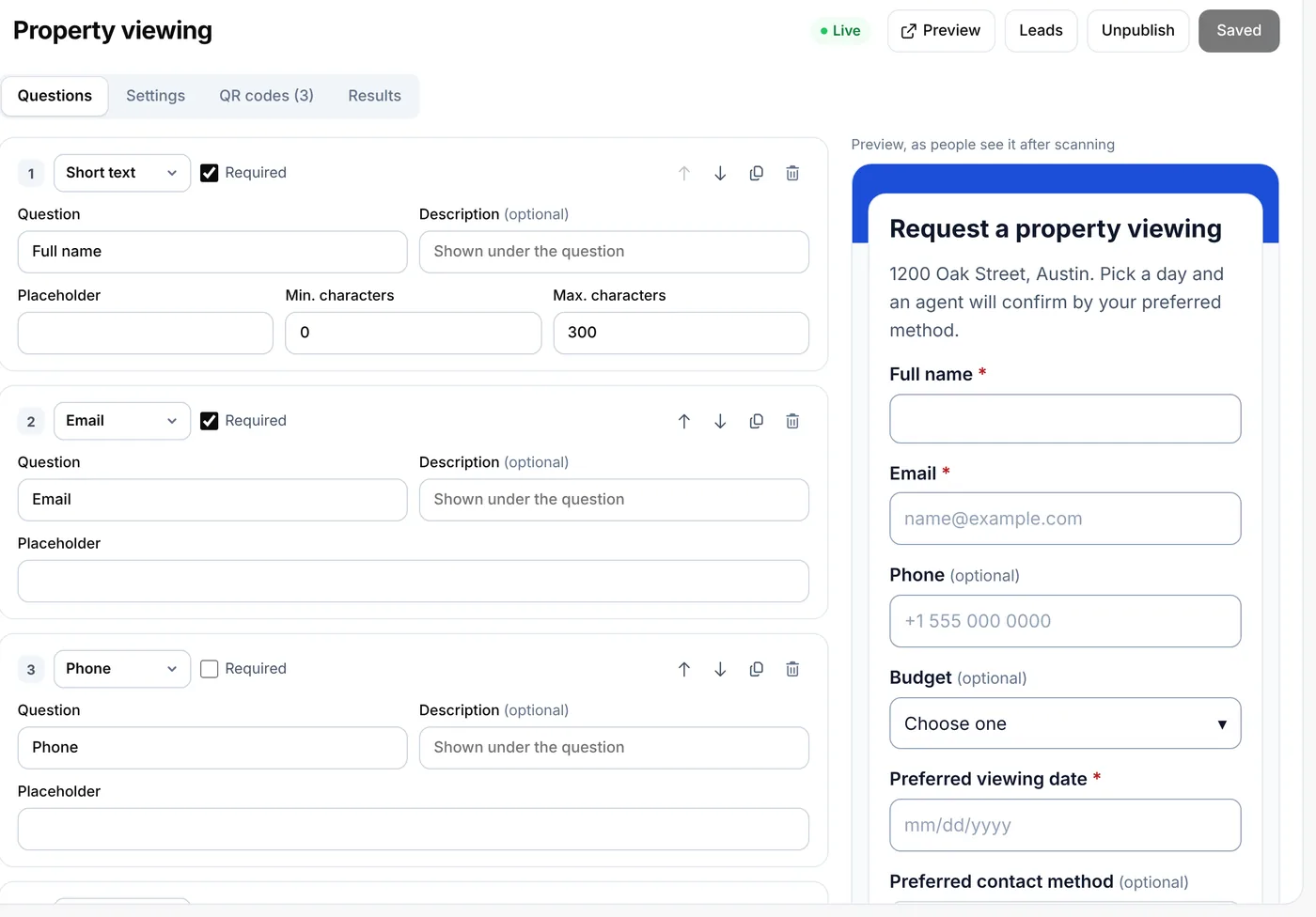 QR lead formsThe forms behind the request code.
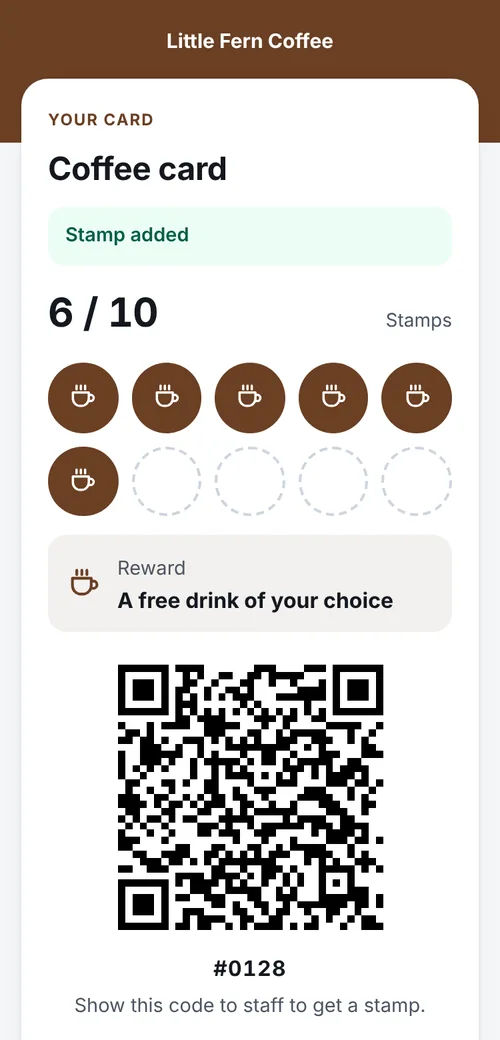 QR code loyalty cardsStamp cards on the phone, no app.
- Page templatesBrowse 36 mobile landing page templates for restaurants, salons, gyms, clinics, events and weddings. Add your details and connect it to a QR code.
 Instagram QR codePeople scan and land on your profile, ready to follow.
- Google review QR codeCustomers scan and land straight on your Google review form.