QR codes for customer feedback
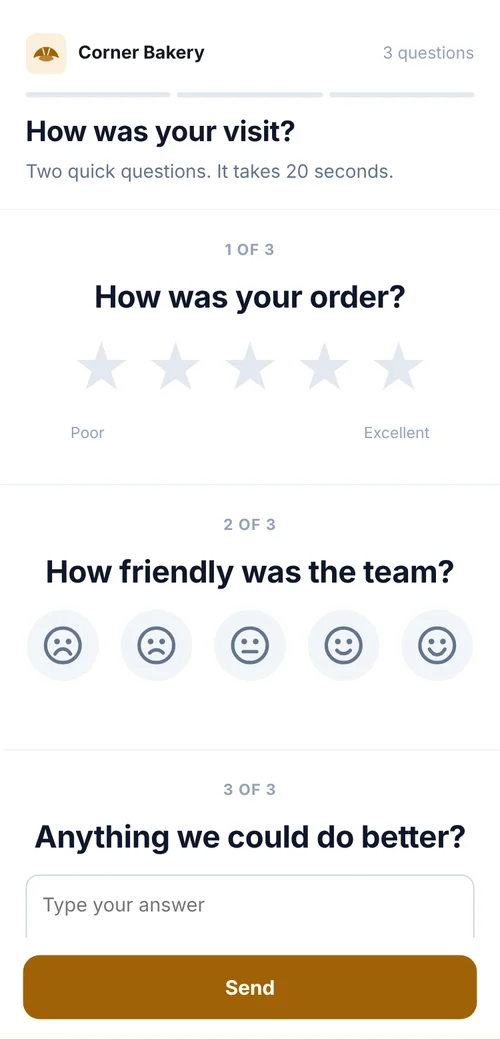
Most customers will answer one question if it takes a minute. A code on the receipt or the counter opens a short rating form, and every answer lands in one list with the location it came from.

In short
How QR code feedback works
In shortA code on the receipt or counter opens a one-minute rating form. Every answer lands in one list tagged with the branch or counter it came from. A separate review code sends everyone to your public reviews.
At a glance
- Feedback form
- Rating, comment, optional contact
- Where it came from
- Each reply tagged with its code
- Public reviews
- A review code everyone can use
- Follow-up
- Reply by email or phone from the lead
- Retention
- Delete old replies automatically
The workflow
One minute for the customer, one list for you
Create the form
From the customer feedback template: a rating, “How was your experience?” and “Anything we could do better?”.
One code per location
Or per counter, so you can compare branches.
Print it where people wait
The receipt, the table, the checkout counter, with “Tell us how we did (1 minute)”.
Act on it
Filter low ratings in Leads, reply to people who left details, and mark them contacted.
Choosing
Feedback form or review link?
Many businesses use both: the form on the receipt, the review code on the door.
| Compared | Feedback form | Review code |
|---|---|---|
| Who sees it | Only you | Everyone, on Google |
| What you learn | What to fix, and where | Your public rating |
| Contact details | Optional, so you can reply | None |
| Price | Any paid plan | Free |
Show the review code to everyone the same way. Google doesn’t allow asking only happy customers for reviews (review gating).
Placement
Where each code goes
| Compared | What it opens | Print it at |
|---|---|---|
| Receipts and bills | The feedback form, just after people have paid | About 1 in (2.5 cm) |
| Tables and counters | The feedback form, on a small stand | 1.2–1.6 in (3–4 cm) |
| Delivery bags and parcels | The feedback form, on the insert | 1 in (2.5 cm) |
| Waiting areas | A poster with the form | At least 4 in (10 cm) |
| Front door | The Google review code | 2–3 in (5–8 cm) |
Plans
What it costs
Lite and Pro start with a 7-day free trial.
Free
- The Google review code
- No watermark, no expiry
Lite, $9 a month or $72 a year
- 3 forms and 500 replies a month
- One code per branch or counter, up to 25
- Pro ($24 a month) adds 100 forms, 10,000 replies and team seats
Good to know
Mistakes to avoid
- Asking for ten thingsOne rating and an optional comment get far more replies than a long survey.
- Steering only happy customersReview gating isn’t allowed. Use the private form to hear what to fix.
- Never answeringReply to the comments that need it, and change what keeps coming up.
- One code for every branchA code per place shows where problems start.
FAQ
Questions people ask
Can’t find yours? A person answers every email within 2 working days.
Email usIs the feedback anonymous?
Yes, unless you ask for contact details. Make those questions optional if you want honest answers.
How do I stop spam replies?
Replies are checked on our server for bots and repeated submissions before they reach your list.
Can I compare branches?
Yes. Give each branch its own code; every reply shows the code it came from, and you can filter by it.
Keep reading