- Home
- QR code types
- Event QR code
Event QR code generator
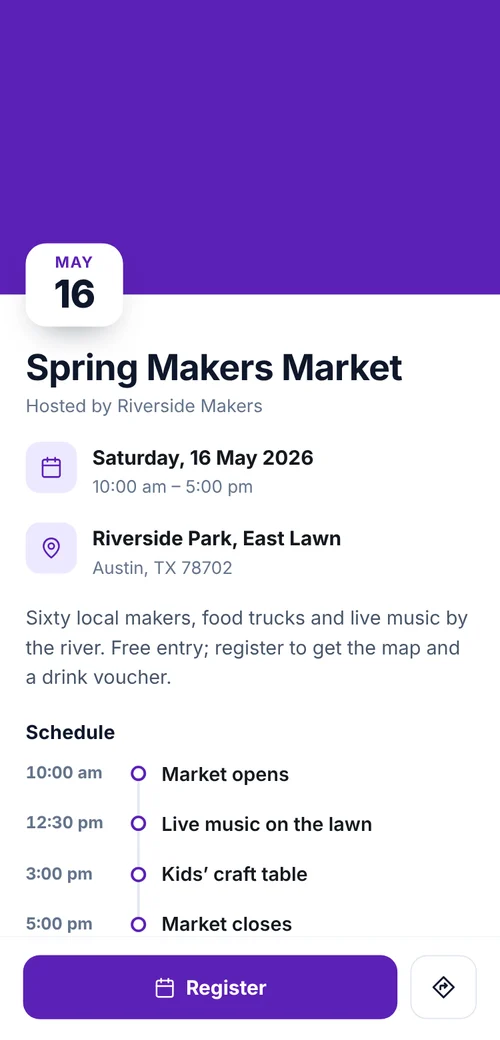
Put a QR code on your poster or invitation that opens the event’s details: date, time, venue and schedule, with a button that adds it to the guest’s calendar.
 Spring Makers Market
Definition
What is an event QR code?
In shortAn event QR code opens a page we host with the date, time, venue and schedule, and an Add to calendar button. If the time or place changes, you edit the page and every printed code shows the new details.
The calendar button downloads a standard calendar file, which works with Apple Calendar, Google Calendar and Outlook. To take registrations as well, add a form.
At a glance
- Plan
- Any paid plan (hosted page)
- Shows
- Date and time, venue and address, schedule, Add to calendar
- Edit after printing
- Yes, any time
- Code type
- Dynamic
- Scan analytics
- Included
How it works
Make one in four steps
Choose Event
Open the generator and pick Event, signed in on a paid plan.
Add the date and place
Start and end time, venue and address.
Add a schedule
Optional: a line for each part of the day.
Download and print
PNG for screens; SVG, PDF or EPS for print. Add a frame so people know what the code does.
Where to use it
Where it helps
- Posters and flyersAll the details without filling the poster.
- InvitationsWeddings, parties and open days.
- Tickets and badgesThe schedule in every pocket.
- Venue signsWhat’s on today, updated each morning.
Good to know
Things to know
- Plans changed? Edit the pagePrinted posters stay correct.
- Need a guest list?Use a registration form to collect names.
- The code keeps workingIf a plan ends, the page stays up and the code keeps opening it. You can’t edit it until you subscribe again.
- Try it firstLite and Pro start with a 7-day free trial. Cancel before day 8 and nothing is charged.
FAQ
Questions people ask
Can’t find yours? A person answers every email within 2 working days.
Email usIs an event QR code free?
Hosted pages need a paid plan; Lite and Pro start with a 7-day free trial. Static types such as a link, Wi-Fi or a contact card are free.
Which calendars does the button work with?
Apple Calendar, Google Calendar, Outlook and others that open a standard calendar file.
Can I change the page after printing?
Yes. Edit it in your account and the printed code shows the new version on the next scan.
Keep reading